Couldn't load pickup availability
💰 180-day money-back guarantee

Oqavelrix™ Visual Clarity Glass
Keep What Matters in View.
A busy room does not have to define your workspace.
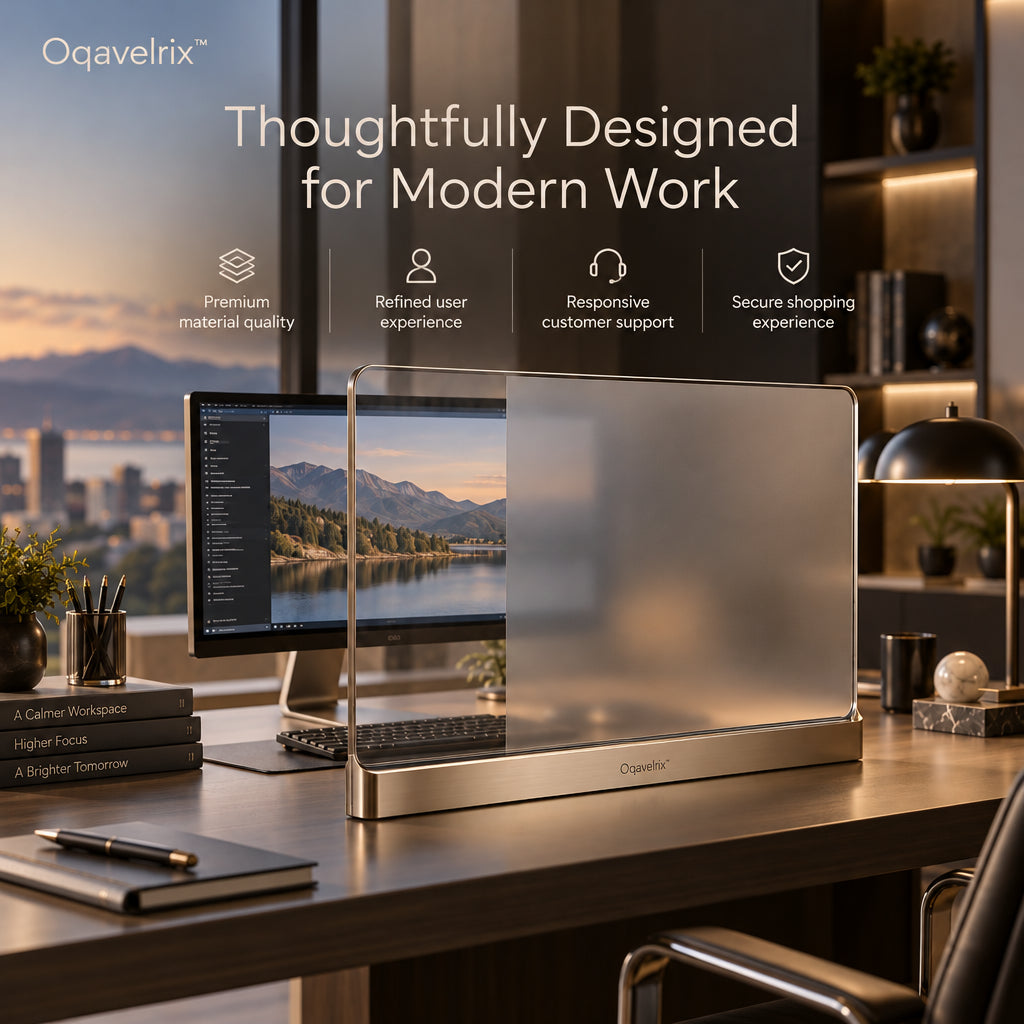
Oqavelrix™ Visual Clarity Glass is a freestanding, adjustable optical panel that helps you shape the visual environment around your desk. Combining electrochromic glass, adjustable transparency, and selective diffusion zones, it lets you keep chosen areas visible while softening background details that compete for your attention.
Open up your view when you want to feel connected to the room. Introduce gentle diffusion when you need a quieter backdrop. Create partial screening when the task calls for a more defined working area.
All within a slim glass-and-metal form designed to belong in a thoughtfully furnished workspace.

Your Desk Is Organized. What About the View Beyond It?
Even a carefully arranged desk can face a visually busy environment: open shelving, shared living areas, decorative objects, or movement elsewhere in the room.
Visual Clarity Glass adds an adjustable layer between your working area and selected parts of that background. Instead of changing the entire room, you can change how much of it remains visually prominent from your seat.
The purpose is simple: give you more choice over what stays in view while you work.
Position the panel around your preferred sightline, keeping essential screen content and reference materials clearly visible.

One Workspace. Three Visual Settings.
Your visual needs can change throughout the day. Visual Clarity Glass offers three ways to arrange the view around your work.
Transparent — Stay Connected
Keep the panel clear when you want an open view of your surroundings. This setting suits moments when visibility and connection to the room matter most.
Soft Light — Soften the Background
Introduce diffusion to make background details less visually distinct. Use it when you want a gentler backdrop for reading, writing, or reviewing work.
Partial Shield — Choose What Remains Visible
Combine clear and diffused areas to create selective visual separation. Preserve an open section where you need visibility while screening another portion of the background.
The difference is control: your workspace can feel open, softly filtered, or more sheltered without requiring a permanent opaque divider.

Adapt the View to the Work
A day at your desk rarely involves just one kind of task.
You might begin by checking messages, move into a detailed proposal, and finish by reviewing printed references. Visual Clarity Glass lets you adjust the visual setting as you move between those activities.
-
For everyday desk work: Keep an open view when you want awareness of the room around you.
-
For writing and detailed review: Soften selected background areas to make the immediate workspace feel less visually busy.
-
For creative work: Keep useful references visible while diffusing unrelated surroundings.
-
For a shared home office: Establish a visual boundary around your working position without enclosing the entire desk.
Choose the setting that feels appropriate to the task. There is no need to use the same level of transparency all day.

An Independent Optical Interface for Your Desk
Visual Clarity Glass is a separate desktop object, giving it a different role from a screen-mounted filter or a fixed office partition.
| Feature | What It Adds to Your Workspace |
|---|---|
| Freestanding format | A separate optical layer that can be positioned around your desk layout |
| Adjustable transparency | A choice between clearer and more visually screened settings |
| Selective diffusion zones | The ability to soften chosen areas while leaving others visible |
| Slim glass panel | Visual separation with a light, architectural appearance |
| Metal base | A defined desktop footprint and a refined structural finish |
It is designed to manage the view around your work. It does not replace a monitor privacy filter or provide sound isolation.
Refined Materials, Purposeful Presence
The design brings together a slim glass panel, clean edge detailing, and a brushed, champagne-toned aluminum base.
Transparent and diffused surfaces create subtle changes in depth, while the warm metal finish gives the piece a sense of structure. Its restrained profile pairs naturally with neutral interiors, wood desktops, and contemporary office equipment.
This is a functional object designed to remain part of the room’s composition—even when you are away from the desk.

Made for Workspaces That Are Part of Everyday Life
A home office often serves more than one purpose. It may occupy a corner of a living room, share space with a personal library, or sit beside an area used by other people.
Visual Clarity Glass is especially suited to people who want more control over their immediate visual surroundings while preserving the character of the space.
Consider it for:
-
Home-office users working in open or multipurpose rooms
-
Writers and researchers who spend time with detailed material
-
Designers who alternate between screen work and physical references
-
Professionals who prefer a lighter-looking alternative to an opaque desktop divider
The best placement depends on your desk dimensions, monitor position, and the background you want to soften.

How to Arrange Your Workspace
1. Start With Your Seated View
Sit in your usual working position and identify the background areas you would prefer to soften. Keep your main screen and frequently used materials in mind.
2. Position the Panel
Place Visual Clarity Glass on a stable, level desktop. Arrange it so the panel addresses the background area you want to manage without obstructing essential content.
3. Choose Your Visual Setting
Select a transparent, softly diffused, or partially screened configuration according to your current task.
4. Refine as You Work
Revisit the setting when you move from general desk work to reading, reviewing, or creating. Small adjustments can help you find the visual arrangement you prefer.
From Daytime Work to Evening Study
As the room changes from daylight to warm evening lighting, the glass-and-metal form remains a composed part of the desktop.
Use the panel to define a personal working area during the day, then adjust the view for an evening reading or planning session. Its role remains consistent: helping you arrange the visual surroundings of the task in front of you.

Frequently Asked Questions
What is Visual Clarity Glass?
It is a freestanding desktop optical panel with adjustable transparency and selective diffusion. It is designed to help manage background visibility around a working area.
Is it a monitor, touchscreen, or projection display?
No. It is an optical workspace panel. It does not display digital content or replace your computer monitor.
Does it attach to my screen?
It is designed as an independent desktop unit rather than a film applied to a monitor. Its placement should be planned around your screen and working sightline.
Can I keep part of the panel clear?
The selective diffusion concept allows clear and softened areas to be combined, supporting partial visual screening.
Will it stop other people from seeing my screen?
It should not be relied on for protecting confidential screen content. Its primary purpose is managing your visual surroundings, rather than providing certified screen privacy.
Does it reduce noise?
The product is intended for visual management. No sound-isolation performance is specified.
Does it need to sit directly in front of my monitor?
Placement should follow your desk layout and the background you want to soften. Avoid positioning a diffused area where it would obscure screen content you need to read.
What should I check before ordering?
Confirm the final product dimensions, base footprint, power requirements, control method, and available diffusion-zone configurations. These details will help you assess whether it suits your workspace.
Give Your Attention a More Considered Setting
You do not need to redesign the entire room to rethink the view from your desk.
Oqavelrix™ Visual Clarity Glass brings adjustable transparency, selective diffusion, and architectural simplicity into one dedicated workspace object.
Keep your surroundings connected. Make your working area your own.